Installing mysql failed half way through. I found out updating the yum get the installation going again.
ERROR with rpm_check_debug vs depsolve:
libmysqlclient.so.16()(64bit) is needed by postfix-2:2.6.6-6.el6_5.x86_64
libmysqlclient.so.16(libmysqlclient_16)(64bit) is needed by postfix-2:2.6.6-6.el6_5.x86_64
You could try running: rpm -Va --nofiles --nodigest
Your transaction was saved, rerun it with: yum load-transaction /tmp/yum_save_tx-2014-11-04-14-043H0I1S.yumtx
Symptom
##################################################################
uname -a
Linux baja 2.6.32-220.el6.x86_64 #1 SMP Wed Nov 9 08:03:13 EST 2011 x86_64 x86_64 x86_64 GNU/Linux
[root@baja Downloads]# ls -lrt
total 227192
-rw-r--r--. 1 root root 232632160 Nov 4 12:56 V47181-01.zip
drwxr-xr-x. 2 root root 4096 Nov 4 13:40 mysql_commercial
-rw-r--r--. 1 root root 5824 Nov 4 13:57 mysql-community-release-el6-5.noarch.rpm
[root@baja Downloads]# rpm -Uvh mysql-community-release-el6-5.noarch.rpm
Preparing... ########################################### [100%]
1:mysql-community-release########################################### [100%]
[root@baja Downloads]#
total 227192
-rw-r--r--. 1 root root 232632160 Nov 4 12:56 V47181-01.zip
drwxr-xr-x. 2 root root 4096 Nov 4 13:40 mysql_commercial
-rw-r--r--. 1 root root 5824 Nov 4 13:57 mysql-community-release-el6-5.noarch.rpm
[root@baja Downloads]# rpm -Uvh mysql-community-release-el6-5.noarch.rpm
Preparing... ########################################### [100%]
1:mysql-community-release########################################### [100%]
[root@baja Downloads]#
[root@baja Downloads]# yum repolist all|grep mysql
mysql-connectors-community MySQL Connectors Community enabled: 12
mysql-connectors-community-source MySQL Connectors Community - S disabled
mysql-tools-community MySQL Tools Community enabled: 15
mysql-tools-community-source MySQL Tools Community - Source disabled
mysql55-community MySQL 5.5 Community Server disabled
mysql55-community-source MySQL 5.5 Community Server - S disabled
mysql56-community MySQL 5.6 Community Server enabled: 95
mysql56-community-source MySQL 5.6 Community Server - S disabled
mysql57-community-dmr MySQL 5.7 Community Server Dev disabled
mysql57-community-dmr-source MySQL 5.7 Community Server Dev disabled
[root@baja Downloads]#
mysql-connectors-community MySQL Connectors Community enabled: 12
mysql-connectors-community-source MySQL Connectors Community - S disabled
mysql-tools-community MySQL Tools Community enabled: 15
mysql-tools-community-source MySQL Tools Community - Source disabled
mysql55-community MySQL 5.5 Community Server disabled
mysql55-community-source MySQL 5.5 Community Server - S disabled
mysql56-community MySQL 5.6 Community Server enabled: 95
mysql56-community-source MySQL 5.6 Community Server - S disabled
mysql57-community-dmr MySQL 5.7 Community Server Dev disabled
mysql57-community-dmr-source MySQL 5.7 Community Server Dev disabled
[root@baja Downloads]#
[root@baja Downloads]# yum install mysql-community-server
Loaded plugins: product-id, refresh-packagekit, rhnplugin, security, subscription-manager
Updating certificate-based repositories.
Setting up Install Process
Resolving Dependencies
--> Running transaction check
---> Package mysql-community-server.x86_64 0:5.6.21-2.el6 will be installed
--> Processing Dependency: mysql-community-common(x86-64) = 5.6.21-2.el6 for package: mysql-community-server-5.6.21-2.el6.x86_64
--> Processing Dependency: mysql-community-client(x86-64) = 5.6.21-2.el6 for package: mysql-community-server-5.6.21-2.el6.x86_64
--> Running transaction check
---> Package mysql-community-client.x86_64 0:5.6.21-2.el6 will be installed
--> Processing Dependency: mysql-community-libs(x86-64) = 5.6.21-2.el6 for package: mysql-community-client-5.6.21-2.el6.x86_64
---> Package mysql-community-common.x86_64 0:5.6.21-2.el6 will be installed
--> Running transaction check
---> Package mysql-community-libs.x86_64 0:5.6.21-2.el6 will be obsoleting
---> Package mysql-libs.x86_64 0:5.1.52-1.el6_0.1 will be obsoleted
--> Processing Dependency: libmysqlclient.so.16()(64bit) for package: 2:postfix-2.6.6-2.2.el6_1.x86_64
--> Processing Dependency: libmysqlclient.so.16(libmysqlclient_16)(64bit) for package: 2:postfix-2.6.6-2.2.el6_1.x86_64
--> Running transaction check
---> Package postfix.x86_64 2:2.6.6-2.2.el6_1 will be updated
---> Package postfix.x86_64 2:2.6.6-6.el6_5 will be an update
--> Processing Dependency: libssl.so.10(libssl.so.10)(64bit) for package: 2:postfix-2.6.6-6.el6_5.x86_64
--> Processing Dependency: libcrypto.so.10(libcrypto.so.10)(64bit) for package: 2:postfix-2.6.6-6.el6_5.x86_64
--> Processing Dependency: libcrypto.so.10(OPENSSL_1.0.1_EC)(64bit) for package: 2:postfix-2.6.6-6.el6_5.x86_64
--> Processing Dependency: libcrypto.so.10(OPENSSL_1.0.1)(64bit) for package: 2:postfix-2.6.6-6.el6_5.x86_64
--> Running transaction check
---> Package openssl.x86_64 0:1.0.0-20.el6 will be updated
---> Package openssl.x86_64 0:1.0.1e-30.el6_6.2 will be an update
--> Finished Dependency Resolution
Dependencies Resolved
==============================================================================================================
Package Arch Version Repository Size
==============================================================================================================
Installing:
mysql-community-libs x86_64 5.6.21-2.el6 mysql56-community 1.9 M
replacing mysql-libs.x86_64 5.1.52-1.el6_0.1
mysql-community-server x86_64 5.6.21-2.el6 mysql56-community 53 M
Installing for dependencies:
mysql-community-client x86_64 5.6.21-2.el6 mysql56-community 18 M
mysql-community-common x86_64 5.6.21-2.el6 mysql56-community 299 k
Updating for dependencies:
openssl x86_64 1.0.1e-30.el6_6.2 rhel-x86_64-server-6 1.5 M
postfix x86_64 2:2.6.6-6.el6_5 rhel-x86_64-server-6 2.0 M
Transaction Summary
==============================================================================================================
Install 4 Package(s)
Upgrade 2 Package(s)
Total download size: 76 M
Is this ok [y/N]: y
Downloading Packages:
Downloading Packages:
(1/6): mysql-community-client-5.6.21-2.el6.x86_64.rpm | 18 MB 03:16
(2/6): mysql-community-common-5.6.21-2.el6.x86_64.rpm | 299 kB 00:01
(3/6): mysql-community-libs-5.6.21-2.el6.x86_64.rpm | 1.9 MB 00:13
(4/6): mysql-community-server-5.6.21-2.el6.x86_64.rpm | 53 MB 08:46
(5/6): openssl-1.0.1e-30.el6_6.2.x86_64.rpm | 1.5 MB 00:16
(6/6): postfix-2.6.6-6.el6_5.x86_64.rpm | 2.0 MB 00:20
-----------------------------------------------------------------------------------
Total 98 kB/s | 76 MB 13:16
Loaded plugins: product-id, refresh-packagekit, rhnplugin, security, subscription-manager
Updating certificate-based repositories.
Setting up Install Process
Resolving Dependencies
--> Running transaction check
---> Package mysql-community-server.x86_64 0:5.6.21-2.el6 will be installed
--> Processing Dependency: mysql-community-common(x86-64) = 5.6.21-2.el6 for package: mysql-community-server-5.6.21-2.el6.x86_64
--> Processing Dependency: mysql-community-client(x86-64) = 5.6.21-2.el6 for package: mysql-community-server-5.6.21-2.el6.x86_64
--> Running transaction check
---> Package mysql-community-client.x86_64 0:5.6.21-2.el6 will be installed
--> Processing Dependency: mysql-community-libs(x86-64) = 5.6.21-2.el6 for package: mysql-community-client-5.6.21-2.el6.x86_64
---> Package mysql-community-common.x86_64 0:5.6.21-2.el6 will be installed
--> Running transaction check
---> Package mysql-community-libs.x86_64 0:5.6.21-2.el6 will be obsoleting
---> Package mysql-libs.x86_64 0:5.1.52-1.el6_0.1 will be obsoleted
--> Processing Dependency: libmysqlclient.so.16()(64bit) for package: 2:postfix-2.6.6-2.2.el6_1.x86_64
--> Processing Dependency: libmysqlclient.so.16(libmysqlclient_16)(64bit) for package: 2:postfix-2.6.6-2.2.el6_1.x86_64
--> Running transaction check
---> Package postfix.x86_64 2:2.6.6-2.2.el6_1 will be updated
---> Package postfix.x86_64 2:2.6.6-6.el6_5 will be an update
--> Processing Dependency: libssl.so.10(libssl.so.10)(64bit) for package: 2:postfix-2.6.6-6.el6_5.x86_64
--> Processing Dependency: libcrypto.so.10(libcrypto.so.10)(64bit) for package: 2:postfix-2.6.6-6.el6_5.x86_64
--> Processing Dependency: libcrypto.so.10(OPENSSL_1.0.1_EC)(64bit) for package: 2:postfix-2.6.6-6.el6_5.x86_64
--> Processing Dependency: libcrypto.so.10(OPENSSL_1.0.1)(64bit) for package: 2:postfix-2.6.6-6.el6_5.x86_64
--> Running transaction check
---> Package openssl.x86_64 0:1.0.0-20.el6 will be updated
---> Package openssl.x86_64 0:1.0.1e-30.el6_6.2 will be an update
--> Finished Dependency Resolution
Dependencies Resolved
==============================================================================================================
Package Arch Version Repository Size
==============================================================================================================
Installing:
mysql-community-libs x86_64 5.6.21-2.el6 mysql56-community 1.9 M
replacing mysql-libs.x86_64 5.1.52-1.el6_0.1
mysql-community-server x86_64 5.6.21-2.el6 mysql56-community 53 M
Installing for dependencies:
mysql-community-client x86_64 5.6.21-2.el6 mysql56-community 18 M
mysql-community-common x86_64 5.6.21-2.el6 mysql56-community 299 k
Updating for dependencies:
openssl x86_64 1.0.1e-30.el6_6.2 rhel-x86_64-server-6 1.5 M
postfix x86_64 2:2.6.6-6.el6_5 rhel-x86_64-server-6 2.0 M
Transaction Summary
==============================================================================================================
Install 4 Package(s)
Upgrade 2 Package(s)
Total download size: 76 M
Is this ok [y/N]: y
Downloading Packages:
Downloading Packages:
(1/6): mysql-community-client-5.6.21-2.el6.x86_64.rpm | 18 MB 03:16
(2/6): mysql-community-common-5.6.21-2.el6.x86_64.rpm | 299 kB 00:01
(3/6): mysql-community-libs-5.6.21-2.el6.x86_64.rpm | 1.9 MB 00:13
(4/6): mysql-community-server-5.6.21-2.el6.x86_64.rpm | 53 MB 08:46
(5/6): openssl-1.0.1e-30.el6_6.2.x86_64.rpm | 1.5 MB 00:16
(6/6): postfix-2.6.6-6.el6_5.x86_64.rpm | 2.0 MB 00:20
-----------------------------------------------------------------------------------
Total 98 kB/s | 76 MB 13:16
warning: rpmts_HdrFromFdno: V3 DSA/SHA1 Signature, key ID 5072e1f5: NOKEY
Retrieving key from file:/etc/pki/rpm-gpg/RPM-GPG-KEY-mysql
Importing GPG key 0x5072E1F5:
Userid : MySQL Release Engineering <mysql-build@oss.oracle.com>
Package: mysql-community-release-el6-5.noarch (installed)
From : file:/etc/pki/rpm-gpg/RPM-GPG-KEY-mysql
Is this ok [y/N]: y
Running rpm_check_debug
ERROR with rpm_check_debug vs depsolve:
libmysqlclient.so.16()(64bit) is needed by postfix-2:2.6.6-6.el6_5.x86_64
libmysqlclient.so.16(libmysqlclient_16)(64bit) is needed by postfix-2:2.6.6-6.el6_5.x86_64
You could try running: rpm -Va --nofiles --nodigest
Your transaction was saved, rerun it with: yum load-transaction /tmp/yum_save_tx-2014-11-04-14-043H0I1S.yumtx
#################################################################################
Update the yum. I use RHel Update Manager to update all dependencies.
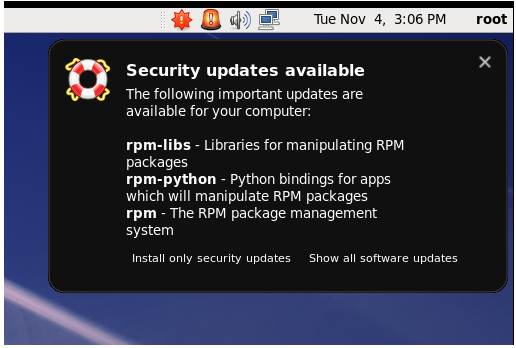

Rerun the installation.
#################################################################################
[root@baja Downloads]# yum install mysql-community-server
Loaded plugins: product-id, refresh-packagekit, rhnplugin, security, subscription-manager
This system is receiving updates from RHN Classic or RHN Satellite.
Setting up Install Process
Resolving Dependencies
--> Running transaction check
---> Package mysql-community-server.x86_64 0:5.6.21-2.el6 will be installed
--> Processing Dependency: mysql-community-client(x86-64) = 5.6.21-2.el6 for package: mysql-community-server-5.6.21-2.el6.x86_64
--> Running transaction check
---> Package mysql-community-client.x86_64 0:5.6.21-2.el6 will be installed
--> Finished Dependency Resolution
Dependencies Resolved
===============================================================================================
Package Arch Version Repository Size
===============================================================================================
Installing:
mysql-community-server x86_64 5.6.21-2.el6 ysql56-community 53 M
Installing for dependencies:
mysql-community-client x86_64 5.6.21-2.el6 mysql56-community 18 M
Transaction Summary
===============================================================================================
Install 2 Package(s)
Total size: 70 M
Installed size: 317 M
Is this ok [y/N]: y
Downloading Packages:
Running rpm_check_debug
Running Transaction Test
Transaction Test Succeeded
Running Transaction
Installing : mysql-community-client-5.6.21-2.el6.x86_64 1/2
Installing : mysql-community-server-5.6.21-2.el6.x86_64 2/2
Verifying : mysql-community-client-5.6.21-2.el6.x86_64 1/2
Verifying : mysql-community-server-5.6.21-2.el6.x86_64 2/2
Installed:
mysql-community-server.x86_64 0:5.6.21-2.el6
Dependency Installed:
mysql-community-client.x86_64 0:5.6.21-2.el6
Complete!
[root@baja Downloads]#
Success installs on RHel! The key is making sure the YUM did get updated. Before stumbled into this, I have tried a lot of other things and messing with the libraries due to bogus dependencies messages.
#################################################################################
[root@baja Downloads]# yum install mysql-community-server
Loaded plugins: product-id, refresh-packagekit, rhnplugin, security, subscription-manager
This system is receiving updates from RHN Classic or RHN Satellite.
Setting up Install Process
Resolving Dependencies
--> Running transaction check
---> Package mysql-community-server.x86_64 0:5.6.21-2.el6 will be installed
--> Processing Dependency: mysql-community-client(x86-64) = 5.6.21-2.el6 for package: mysql-community-server-5.6.21-2.el6.x86_64
--> Running transaction check
---> Package mysql-community-client.x86_64 0:5.6.21-2.el6 will be installed
--> Finished Dependency Resolution
Dependencies Resolved
===============================================================================================
Package Arch Version Repository Size
===============================================================================================
Installing:
mysql-community-server x86_64 5.6.21-2.el6 ysql56-community 53 M
Installing for dependencies:
mysql-community-client x86_64 5.6.21-2.el6 mysql56-community 18 M
Transaction Summary
===============================================================================================
Install 2 Package(s)
Total size: 70 M
Installed size: 317 M
Is this ok [y/N]: y
Downloading Packages:
Running rpm_check_debug
Running Transaction Test
Transaction Test Succeeded
Running Transaction
Installing : mysql-community-client-5.6.21-2.el6.x86_64 1/2
Installing : mysql-community-server-5.6.21-2.el6.x86_64 2/2
Verifying : mysql-community-client-5.6.21-2.el6.x86_64 1/2
Verifying : mysql-community-server-5.6.21-2.el6.x86_64 2/2
Installed:
mysql-community-server.x86_64 0:5.6.21-2.el6
Dependency Installed:
mysql-community-client.x86_64 0:5.6.21-2.el6
Complete!
[root@baja Downloads]#
Success installs on RHel! The key is making sure the YUM did get updated. Before stumbled into this, I have tried a lot of other things and messing with the libraries due to bogus dependencies messages.
